JaNet - Network Tools1.5.1
Publisher Description
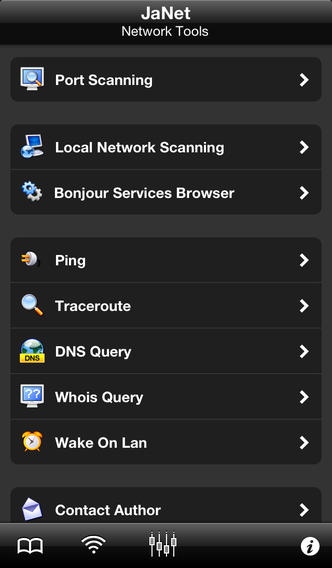
JaNet - Network Tools is one of the best and user-friendly network application currently available for iPhone and iPod touch. JaNet - Network Tools provides an extremely easy, fast and powerful collection of network tools for network security and diagnostic tasks. In particular, JaNet - Network Tools provides in a all-in-one application tools like: port scanner, network scanner, services scanner, ping, traceroute, DNS query, whois and recursive whois, wake-on-lan.
JaNet - Network Tools could be used to:
quickly check for network problems
check if your network devices like firewalls, routers, switches, servers, etc. are up and running
check which unnecessary ports are open in a local or remote machine
quickly check security holes in your network devices
verify which IP addresses are in use in your network
discover hidden machines and devices
scan your local or Wi-Fi network to see if an intruder is using your network
scan your local or Wi-Fi network to verify which devices are currently available
scan your local or Wi-Fi network to get a list of available services and the related providers
identify IP address, MAC address, vendor, name, type and many other information about each device available in your network
retrieve a lot of information about a specific domain, machine or IP address using the integrated WHOIS tool
get the location (country) of a specific machine or device
wake a local or remote device
perform DNS queries
show information about the current used network
JaNet - Network Tools is highly configurable and has a modular structure which easily allows to add more features and tools in the future. JaNet - Network Tools has been developed by IT and network professionals with a more then 20 years of programming and network administration experience.
MAIN FEATURES
Scan TCP and UDP port using specific payload
Scan local or Wi-Fi network
Scan available services
Hostname lookup
Windows name lookup (NetBIOS, Samba)
Bonjour name lookup
Device type lookup
MAC address and vendor lookup
Autonomous Systems lookup
Identify devices models
IP-to-Country
Ping hosts
Continuous Ping
Trace hosts (UDP and ICMP protocols)
Specific DNS Queries
Reverse DNS Lookup
Whois domain, hosts, IP address, etc.
Wake-On-Lan
Wake-over-Internet
Display Network information (local IP, External IP, Netmask)
Display DNS servers information
Display current device information
Results caching
Organize operation results in logic groups
Send operation results by mail
Favorites management using logic groups
Different icons for favorites groups and devices
Fast synchronous/asynchronous network I/O
Works with Wi-Fi connectivity
Works with 3G, EDGE and GPRS connectivity (iPhone only)
Nice and user-friendly GUI
Support for fast App switching
Support for Retina display
Support for iPhone 5 display
ABOUT JaNet - Network Tools
The iPhone App Reviews (Rating 5/5): "JaNet Network Tools iPhone app was clearly built by IT professionals. [...] With its eclectic skillset and elegant design, JaNet Network Tools is on its way to becoming a fast favorite with network administrators and home owners alike."
iPhoneFootPrint: "JaNet Network Tools makes Network monitoring more easy and gives high portability to Network Administrators [...]. Overall JaNet Network Tools is a very powerful utility app which not only caters to the needs to advanced users but also is really user-friendly to be used by average users."
MORE INFORMATION
Additional pictures, video and information are available on the JaNet - Network Tools website.
Requires iOS 4.3 or later. Compatible with iPhone, iPad, and iPod touch.
About JaNet - Network Tools
The company that develops JaNet - Network Tools is Michele Nucci. The latest version released by its developer is 1.5.1. This app was rated by 3 users of our site and has an average rating of 3.7.
To install JaNet - Network Tools on your iOS device, just click the green Continue To App button above to start the installation process. The app is listed on our website since 2010-12-06 and was downloaded 47 times. We have already checked if the download link is safe, however for your own protection we recommend that you scan the downloaded app with your antivirus. Your antivirus may detect the JaNet - Network Tools as malware if the download link is broken.
How to install JaNet - Network Tools on your iOS device:
- Click on the Continue To App button on our website. This will redirect you to the App Store.
- Once the JaNet - Network Tools is shown in the iTunes listing of your iOS device, you can start its download and installation. Tap on the GET button to the right of the app to start downloading it.
- If you are not logged-in the iOS appstore app, you'll be prompted for your your Apple ID and/or password.
- After JaNet - Network Tools is downloaded, you'll see an INSTALL button to the right. Tap on it to start the actual installation of the iOS app.
- Once installation is finished you can tap on the OPEN button to start it. Its icon will also be added to your device home screen.
